
If, like me, you are being assaulted by spambots sending Russian propaganda and links, that come in via both the Nearby Chat window and also as IMs, then you will doubtless be wanting some respite from it!
These spams are generally in Russian (the Cyrllic alphabet) and often are news propaganda about the war in Ukraine.
Well, help is at hand with Firestorm’s Omnifilter, which is a semi-recent addition that not many people know about.
The quick info
To dive straight in and get this working, open the Omnifilter (it’s under the Comm menu) and set up a filter like this:
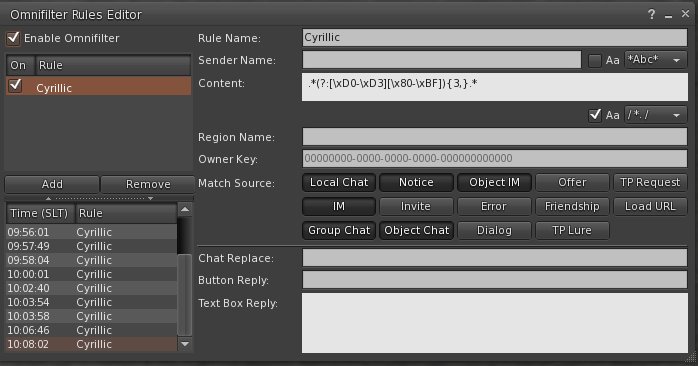
Specifically, you are specifying regex mode, case sensitive, with the following regex:
.*(?:[\xD0-\xD3][\x80-\xBF]){3,}.*
Make sure to set it up exactly like mine, and also set the filter to “On”
That’s it. You don’t need to read any further
NOTE: This is a fairly strict filter that fires on only 3 letters of the Cyrillic alphabet being present. Feel free to change the {3,} to a larger number if legit messages get blocked.
Under the hood
There are a few little quirks I discovered whilst developing this, which I will share in case you are interested. It’s just background information and you do not need to know this to set up the filter.
Firstly it’s unclear how one gets on their radar, but when you do then the spam is fairly relentless and the mechanism is fairly sophisticated using burner accounts and temp-rezz objects. So trying to locate the sim where the object is rezzed is fruitless as it will be gone by the time you get there. And blocking the account sending the IMs is playing whack-a-mole.
Next, I noticed in the source code of Firestorm that the Omnifilter is using std::string throughout, presumably with UTF-8, so a regex like
[\x{0400}-\x{04FF}]{5,}
won’t work. In fact it can cause a Crash to Desktop!
Instead we examine the characters as byte pairs to determine if the letter is Cyrillic.
And, also it is very important that case sensitivity is turned on, otherwise the string is put through LLStringUtil::toLower() which can cause issues.
